


ILLUMINATOR Digital Watch face
4.3118.00 Reviews
App Specs
- Version
- Varies with Device
- Updated On
- License
- $2.49
- Downloads
- 50,000+
- Developer
- WatchBase
- Categories
- Personalization
- Platform
- Android
Screenshots
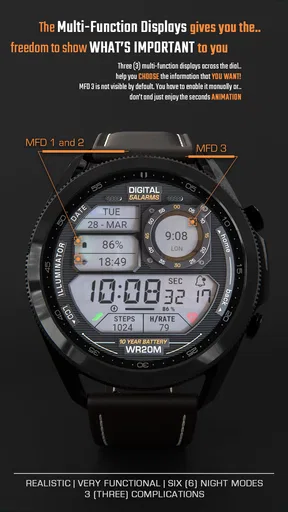
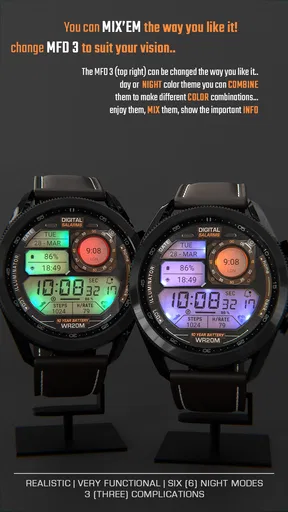
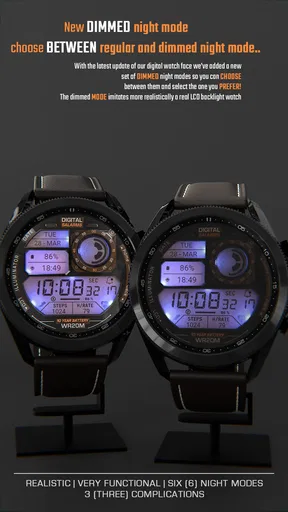
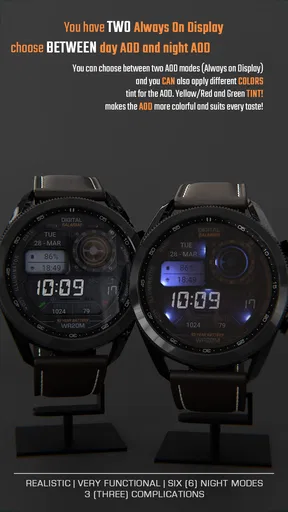
 Analysis by AppCompare
Hey there! So, I recently got my hands on this cool app called ILLUMINATOR Digital Watch Face, and I’ve been playing around with it on my smartwatch. If you’re a fan of customizing your watch face to match your style or mood, you’re going to want to hear about this one.
Readability and navigation on the wrist
A watch face has a different job from a phone app: it needs to answer a question quickly, often while I’m moving, without asking me to study a screen. That is the lens I use when judging a digital design. The appeal here is the promise of a clear, direct time display, with a look that can feel more expressive than the plain faces many watches include by default.
For a reader choosing a watch face, the useful test is not simply whether it looks polished in a setup screen. It is whether the information I care about remains easy to pick out at a glance after I choose a color and arrange the display. I would start with the time as the priority, then add only the extra information I genuinely check. A face crowded with details can make a small screen harder to scan, even when every item seems useful on its own.
That makes this a better fit for someone who enjoys tuning a display than for someone who wants a one-tap, never-think-about-it setup. I would take a moment to check the chosen layout in ordinary lighting and while walking, rather than deciding from a static preview. The watch is worn at an angle, and that real-world glance is a more honest readability check than staring at it straight on.
Motor and sensory considerations
There is a practical benefit to having a watch face that can be prepared in advance: once it is set up, checking the time does not require opening a phone app or navigating through several screens. That can be convenient when my hands are occupied, when I am carrying something, or when taking out a phone would interrupt a conversation. The setup itself is a separate matter, though. Customization is most comfortable when I have time to make deliberate choices rather than trying to change settings in a hurry.
Color choices can make a display feel more personal, but they also create a trade-off. A vivid theme may be enjoyable in a relaxed setting, while a calmer combination can be easier to live with during a long workday. I would choose a version that keeps the digits distinct from the background instead of picking a color only because it looks striking in a preview. Anyone sensitive to bright screens may prefer a restrained look and should judge the watch in the lighting where it will usually be worn.
Small-screen controls also call for patience. If reaching tiny options or making precise selections is uncomfortable, it is worth doing the customization in a quiet moment and leaving the finished layout alone afterward. A thoughtfully simplified face can reduce repeated interaction; a display packed with things to tap or inspect may have the opposite effect. I would not assume that a colorful or configurable design automatically suits every visual or motor preference.
Worth Reading Before You Choose

EA SPORTS FC Mobile 26 Is a Bigger Football Game, but It Takes Time

Flipboard Shows What News Apps Must Do Beyond the Feed

Switching to Android Auto Means Rethinking Your Driving Routine

Google Calendar Makes a Crowded Week Easier to Manage

Ludo King Makes the Most of the Minutes Between Plans

Baby Panda World Brings Quick Play to Modern Phones, but Its Game Library Feels Busy
Situational access in daily routines
For a realistic example, imagine checking the time between meetings while walking across a building. A watch face earns its place when I can glance down, read what I need, and keep moving. I would set the most important information where my eye naturally lands, choose a clear color treatment, and avoid adding secondary details that I rarely use. The same approach works for errands, a commute, or a casual walk: decide beforehand what deserves space, then let the watch do its simple job.
There is also a useful distinction between a face for a planned activity and one for everyday wear. During exercise, a step count may matter more than decorative choices; at a desk, the time may be all I need. If changing profiles is part of your routine, think through whether you will actually switch them often enough to justify maintaining several setups. A single dependable layout is usually better than a collection of alternatives that takes more attention than it saves.
For people who often check a phone for the time because they dislike the default watch display, a personalized digital face can make the watch more inviting to use. It does not replace a phone’s larger screen or provide the same room for reading. Its strength is the quick wrist-level glance, so I would treat it as a focused display rather than a miniature phone interface.
Where it fits among watch-face options
Compared with the standard faces already on a smartwatch, a dedicated personalization app is most appealing when the built-in choices feel too plain or do not match your taste. A default face may be the better choice if it already shows the information you want and you prefer not to spend time adjusting appearance. The value of customization is personal: it matters most when a well-chosen look makes you more comfortable using the watch every day.
It is also different from choosing a face solely for dense information. If your priority is seeing many complications at once, a more information-heavy option may suit you better, provided your watch supports it. I would not judge this app by how much it can put on screen. For me, its strongest use is making a digital watch face feel considered and readable without turning every glance into a search.
Before paying, I would check that the app is intended for the watch and phone combination I actually use and that its style matches what I want to see all day. It costs $1.99, so the decision is less about a one-time novelty and more about whether I expect to keep the face installed. WatchBase is the developer, and the app is rated for Everyone. Those details make the purchase straightforward to assess, but the best reason to choose it is still a genuine preference for its particular visual approach.
First Impressions
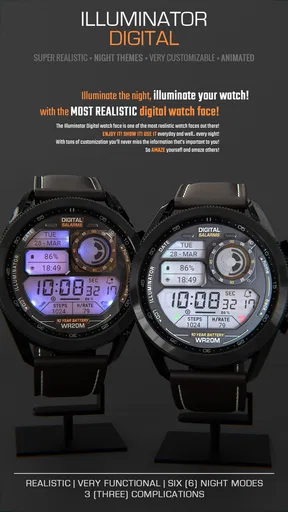
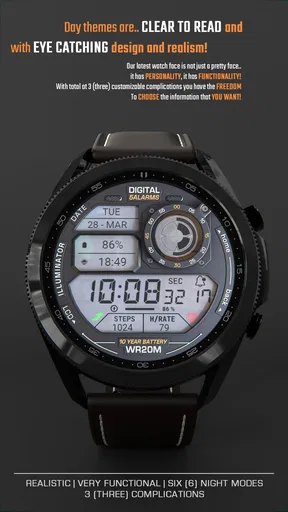
The first thing that struck me about the digital watch face is its sleek design. Right after installing it, I noticed how it brings this minimalistic yet vibrant vibe to my smartwatch. It’s like having a tiny piece of art on your wrist. The interface is intuitive, so you won’t find yourself fumbling around trying to figure out how to set it up or customize it.
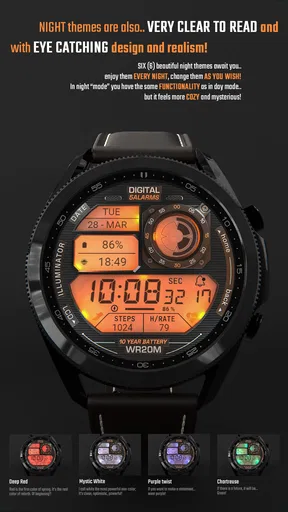
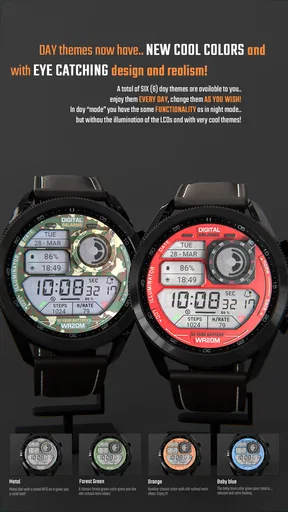
One of the coolest features is the variety of color options. You can literally match it to any outfit or mood. Whether it’s a bright and sunny day or a moody, rainy evening, there’s a color theme that fits just right. Plus, the transition between colors is super smooth – no glitches or weird delays. Impressive!
Customizability at Its Best
Now, let’s talk customization. I’m a sucker for anything I can tweak to my liking, and this app doesn’t disappoint. You can adjust everything from the font style to the widget layout. Want your step count front and center? Done. Prefer a simplistic display with just the time? Easy peasy. The flexibility here is something that really sets this app apart from others I’ve tried.
Not to mention, the app allows you to set up different profiles. So, if you’re like me and switch between workouts, work meetings, and casual hangouts, you can have a different watch face ready for each scenario. It’s really handy!
The most useful way to approach those profiles is to keep each one tied to a real routine instead of creating variations just for the sake of it. I would make one setup for days when a step count is useful and another for times when I want a quieter, time-first display. That keeps the choice practical: the face should reduce friction, not give me one more thing to manage. If I rarely change activities or do not care about different layouts, a single configuration is likely enough.
Performance and Usability
Performance-wise, I found the app to be pretty solid. It doesn’t drain the battery, which is a huge plus because who wants to worry about their watch dying halfway through the day? The app runs smoothly without any noticeable lag, even when switching between different themes and profiles.
Usability is also on point. Everything is straightforward, and the app guides you through each step of the customization process. Even if you’re not tech-savvy, you’ll find it easy to navigate. Plus, the app is regularly updated, which means any bugs or issues are quickly squashed.
My practical tip is to finish the layout before relying on it during a busy day. Set the face up while seated, then check it in the places you actually use the watch: indoors, outside, and during movement. If an extra widget makes the time harder to catch, remove it. That small edit can matter more than another round of color changes, especially for anyone who tends to glance quickly rather than hold the watch close.
Compatibility and Support
Another aspect worth mentioning is compatibility. The app works seamlessly with both Android and iOS devices, which is great if you’re someone who switches between operating systems. I’ve tried it on both, and the experience is consistent and reliable.
Customer support is responsive, which is always a relief. If you run into any snags, they’ve got a helpful team ready to assist. It’s clear that the developers are dedicated to ensuring a smooth user experience.
The app has a 4.2 average from around 1.1 thousand ratings, with 109 written reviews, and has passed 50 thousand installs. It was released on February 22, 2023. I see that level of uptake as a sign that it has found an audience, not proof that it will suit every watch or every preference. If you are deciding whether it is right for you, focus on the display style and on whether you will use its customization rather than treating popularity as a substitute for that fit.
One point I would keep in mind is that using a watch face on a daily basis depends on the whole setup: the watch, its operating system, and the way the face appears on that particular screen. I would verify compatibility for my own device before buying, then judge the result on the watch itself rather than assuming a phone preview tells the whole story. If you want an unchanged default face or need a specific accessibility option, compare those needs carefully before committing.
Who should choose it—and who should pass
I would recommend this app to someone who likes a digital look, wants control over the visual details, and is willing to spend a little time making the display suit a routine. It is especially appealing if a plain built-in face feels impersonal and a few considered adjustments would make the watch more pleasant to check. The ability to favor either a simple time display or a layout with a step count gives the customization a practical side, not just a decorative one.
I would skip it if you are already happy with your watch’s included faces, dislike adjusting small screens, or need a display designed around a particular visual accommodation that you have not confirmed it provides. It is also not the right choice if you expect a watch face to replace a phone screen or to make every activity easier without any setup. In those cases, a simpler built-in option—or another face chosen specifically for your essential information—may be a better match.
One question buyers often have is whether this is worthwhile for someone who changes phones or operating systems. Its availability across Android and iOS is encouraging, but I would still check the exact watch pairing before purchasing; phone compatibility by itself does not guarantee that every watch will present the same experience. Another sensible question is whether to keep several profiles. I would only do that if the differences help me make faster decisions during distinct parts of the day. Otherwise, one readable layout is less work and easier to trust.
Final Thoughts
All in all, ILLUMINATOR Digital Watch Face is a fantastic app for anyone looking to add a personal touch to their smartwatch. Whether you’re into vibrant colors or a more subdued look, there’s something here for everyone. It’s easy to use, doesn’t hog your battery, and offers a level of customization that’s hard to beat.
If you haven’t tried it out yet, I’d definitely recommend giving it a go. With its seamless performance and stylish options, it’s a great way to make your smartwatch truly yours. Happy customizing!
Pros
- Highly customizable design options.
- Battery efficient with low power usage.
- Real-time weather updates included.
- Compatible with multiple smartwatch models.
- Easy-to-read interface even in sunlight.
Cons
- Limited free features
- premium needed.
- Occasional syncing delays with phone.
- Lacks interactive complications.
- No built-in fitness tracking features.
- Customization can be overwhelming.
FAQs for ILLUMINATOR Digital Watch face
What features does the ILLUMINATOR Digital Watch Face offer?
The ILLUMINATOR Digital Watch Face offers a range of features including customizable displays, various color themes, weather updates, and fitness tracking integration. It also supports digital time display with options for 12-hour or 24-hour formats, and includes battery status indicators for both the watch and connected device.
Is the ILLUMINATOR Digital Watch Face compatible with all smartwatches?
The ILLUMINATOR Digital Watch Face is designed to be compatible with most Android Wear and Wear OS smartwatches. However, it's always recommended to check the specific compatibility with your device model in the app store description before downloading to ensure full functionality.
How can I customize the settings on the ILLUMINATOR Digital Watch Face?
You can customize the ILLUMINATOR Digital Watch Face through the companion app on your smartphone. The app allows you to change color themes, adjust display settings, and configure notifications and widgets. Detailed instructions are provided within the app to guide users through the customization process.
Does the ILLUMINATOR Digital Watch Face consume a lot of battery?
The ILLUMINATOR Digital Watch Face is optimized for energy efficiency, minimizing battery consumption. However, the extent of battery usage can vary based on the features you activate, such as continuous weather updates or fitness tracking. Users can adjust settings to balance functionality and battery life.
How do I troubleshoot issues with the ILLUMINATOR Digital Watch Face?
If you encounter issues with the ILLUMINATOR Digital Watch Face, first ensure your smartwatch and phone are running the latest software updates. Restart both devices and reinstall the app if necessary. For persistent issues, consult the developer's support page or contact customer service for assistance.


